
Bookcamp: Audiobooks for Plex
BookcampBooks & Reference
4.1131.00 Reviews
- Version
- 2.1.2
- Installs
- 10.00K
- Age Rating
- Everyone
Screenshots

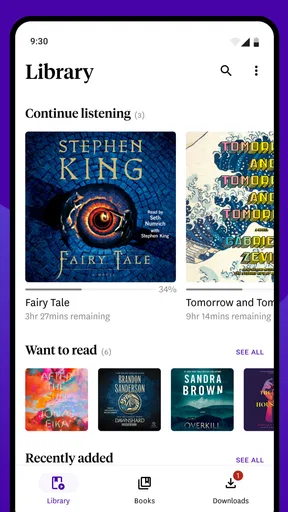
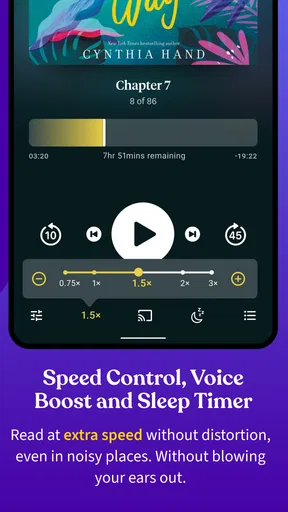
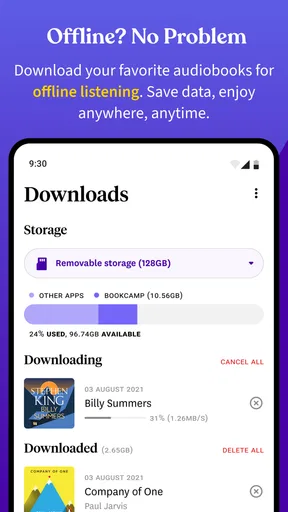
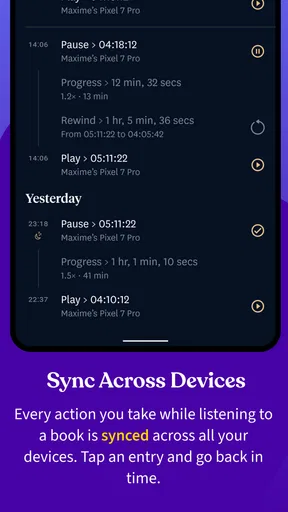
Our Review of Bookcamp: Audiobooks for Plex
 Analysis by Appyee
I approached Bookcamp: Audiobooks for Plex as someone who wanted a simpler way to reach an audiobook collection away from a computer. It belongs to the Books & Reference category, is developed by Bookcamp, and is available free of charge. The basic idea is appealing: use a mobile app to access audiobooks connected to Plex instead of treating a phone as a completely separate library.
That promise is useful, but it comes with an important qualification. This is not the same kind of experience as opening a large commercial audiobook service, choosing a title, and pressing play immediately. Bookcamp sits between a personal-media setup and a mobile listening app. Your experience depends partly on how well your Plex library is arranged, how your server is reachable, and whether the app fits the way you already organize books.
After spending time with it, I think the app is most interesting for people who already use Plex and want audiobooks included in that routine. It is less convincing for someone who simply wants an independent audiobook catalog with no setup decisions. That distinction explains both its strongest qualities and the places where new users can get stuck.
What Bookcamp does well, and where the first obstacles appear
I found the main tradeoff easy to frame: Bookcamp is free to install, but its usefulness depends on having a Plex audiobook library and a server you can reach. I’d test one familiar title at home and away from home before building it into a listening routine; that quickly shows whether the convenience fits your setup. The next section looks at what that effort can—and cannot—give you.
The real appeal is continuity across a personal library
The best part of Bookcamp is the possibility of keeping your own audiobook collection close to the rest of your personal media. Instead of switching between a file browser, a generic music player, and Plex, you can approach spoken-word content through an interface designed for books. That matters when a collection contains long novels, serialized nonfiction, or recordings you have obtained and organized yourself.
I also like the logic of separating audiobooks from ordinary music. A music player can technically play many audio files, but it usually treats every track as an isolated item. Audiobooks need a more thoughtful workflow: finding the right title, continuing from the right place, and recognizing that a chapter is part of a larger work. Bookcamp makes more sense when you want your library to feel like a shelf rather than a folder full of sound files.
The first point of friction is that the app is only as comfortable as the connection between the phone and the Plex environment. A user may install it successfully and still wonder why a book is missing, why a collection looks incomplete, or why playback behaves differently on mobile than it does at home. Those problems are not necessarily caused by the app itself. They often begin with the way the library was created or exposed.
Why a missing title is not always an app failure
When a book does not appear, I would not immediately reinstall Bookcamp. I would first check whether the title is visible in Plex through another client. If it is absent there too, the useful investigation is on the library side: the file location, the library section, naming, and the way Plex has identified the content.
This is a particularly important distinction for audiobook collections because they are often assembled from different sources. One title may be a single large file, another may be divided into chapters, and a third may contain bonus material or multiple narrators. If the collection is inconsistent, an app that reads from Plex may appear unreliable even though it is faithfully displaying what the server has made available.
My practical advice is to test with one uncomplicated title before importing a large collection into your routine. Choose a book whose files are easy to identify and whose playback already works in Plex. That small test tells you more than installing the app and immediately judging it from a complicated library with unusual folders.
The setup checks that save the most time
Before blaming Bookcamp, I would work through a short sequence. First, confirm that the Plex server is running and that the account or connection you normally use can see the audiobook library. Then check the same title from another Plex-compatible route if one is available. Finally, return to Bookcamp and look for the title there. This separates a general server problem from an app-specific display problem.
It is also worth checking whether you are testing at home or away from home. A setup that works perfectly on the same local network may behave differently when the phone uses a mobile connection or another Wi-Fi network. If playback works locally but not elsewhere, the sensible place to investigate is remote access and network reachability rather than repeatedly clearing the app.
Another useful habit is to avoid changing several things at once. If you rename files, move folders, alter Plex settings, and reinstall the app in one session, you lose the ability to identify what fixed the problem. I prefer making one small change, refreshing the library, and testing the same title again. That is slower for a few minutes but much faster than guessing later.
What the phone and server each contribute
Bookcamp is a client in a larger chain. The phone provides the interface and listening experience, while Plex supplies the media organization and access route. A weak network, a sleeping computer, an unavailable server, or an account issue can interrupt the experience even when the app itself has not changed.
This is why I would not treat the app as a replacement for server maintenance. If your Plex host is an old computer that regularly sleeps, your audiobook routine will inherit that interruption. Likewise, if the server is only reachable under certain network conditions, Bookcamp cannot turn an unavailable library into an available one.
For a reliable daily habit, I would prepare the system before a long trip. Open the app while you still have a dependable connection, confirm that the intended book is visible, and start a short playback test. This is a more useful check than assuming that a title shown on the server will automatically be ready in every location.
Recovering a listening session without making the problem worse
Long audiobooks create a special recovery problem: losing your place is more annoying than losing a song. If a session stops unexpectedly, my first move would be to reopen the same title and check the current position rather than immediately starting a different chapter. If the position looks wrong, I would note where I stopped and test whether the issue repeats with that single book.
Keeping a simple mental marker helps when troubleshooting. Remember the chapter name or an approximate scene before closing the app. That gives you a reference point if the playback position is not restored as expected. It also prevents repeatedly scrubbing through a long recording without knowing whether the app has actually saved the latest position.
If a book repeatedly resumes incorrectly while another title behaves normally, compare the two files in Plex. The problem may be tied to the way that particular audiobook is split or identified. A multi-part recording can expose organization issues that remain invisible with a clean, single-file test.
I would also avoid deleting library content as a first response. Removing and re-adding a title can change how Plex recognizes it and may make the situation harder to understand. Start with a controlled refresh or a new test title, then make structural changes only when the evidence points toward the library rather than the mobile client.
When the app is not the cause
Some failures look like Bookcamp problems because the phone is where the user notices them. A server that is offline, a network that blocks access, or a Plex library that has not finished updating can all present as an empty or incomplete mobile experience. The quickest diagnostic question is simple: can the same content be reached elsewhere through the same Plex setup?
If the answer is no, focus on the server and network. If the answer is yes, then compare the affected title with a basic test title and look for a pattern. One missing book suggests a content or organization issue. Every book failing suggests a connection, account, or broader compatibility problem. This kind of separation is more productive than treating every symptom as an app defect.
There is also a difference between a technical failure and a design mismatch. Someone may expect Bookcamp to behave like a dedicated audiobook subscription service, with a ready-made catalog and minimal personal organization. That expectation would lead to disappointment even if the app is functioning exactly as intended. Its value comes from bringing a Plex-based personal collection into a more suitable listening context.
How it compares with ordinary alternatives
A standard music player is often easier to open because it does not depend on Plex. It may also be the better choice for a handful of local files that you rarely change. However, it tends to make audiobook management feel improvised. Chapters can look like unrelated tracks, and a growing collection becomes harder to browse naturally.
A commercial audiobook service is more convenient for discovery, purchasing, and immediate access to a catalog. It is the stronger option if you want recommendations, a ready-to-use library, or content you do not personally host. Bookcamp is aimed at a different need: listening to your own material through a Plex-centered setup.
The comparison with Plex’s ordinary media clients is more nuanced. A general client may already be enough if you only occasionally play audiobooks and do not mind a broad media interface. Bookcamp becomes more attractive when audiobooks are a meaningful part of your collection and you want them treated as books rather than as another group of audio tracks.
Who will get the most from it
I would recommend Bookcamp to a Plex user who has a personal audiobook library, wants mobile access, and is willing to spend a little time keeping that library tidy. It can be especially useful for listeners who move between rooms, commute, or use more than one device but prefer their own collection over a subscription catalog.
It is also a reasonable fit for someone who values ownership and organization. If you have already invested effort in arranging audiobooks on a Plex server, a dedicated companion app can make that work feel more practical on a phone. The benefit is not just playback; it is having a consistent route into material you already chose.
I would skip it if you do not use Plex, dislike managing personal media, or expect every audiobook to appear automatically after installation. I would also choose a simpler local player for a very small collection that never leaves the phone. In that situation, the additional server relationship may create more work than value.
Compatibility, cost, and what to expect from the current release
The app is free to install and is suitable for an Everyone-rated audience. It runs on Android versions from 9 onward, which covers many phones still in everyday use. The current release is version 2.1.2, so I would still keep the app and the surrounding Plex setup reasonably current when diagnosing unusual behavior.
There are in-app purchases ranging from around two dollars to around fifty dollars per item. That makes it sensible to explore the free experience carefully before paying for anything. I would first verify that your own server, library structure, and normal listening route work comfortably. A purchase cannot solve a missing library, an unreachable server, or an audiobook collection that Plex has not organized as expected.
The app has built a modest user base, with over ten thousand installs, and its average rating is 4.1 from around four hundred ratings. I see that as a sign of useful appeal rather than a guarantee that every Plex setup will behave identically. The most relevant question is not whether other users like the general idea, but whether your library and network match the app’s intended workflow.
Small habits that make daily listening smoother
My first habit would be to keep audiobook folders and titles consistent before troubleshooting playback. Consistency helps Plex identify related files and makes it easier to tell whether a problem belongs to one title or the entire library. It also reduces the confusion that comes from having chapters, extras, and alternate versions mixed together.
My second habit would be to test access before relying on the app for an important journey. A short check at home can reveal whether the server is awake, the title is visible, and the connection is working. This is particularly valuable for long recordings, where discovering a problem after leaving home is much more frustrating.
My third habit would be to use one known-good audiobook as a diagnostic reference. If the reference title plays while another does not, resist broad fixes such as reinstalling everything. Compare the files and library entries instead. This approach protects the working part of the setup and points attention toward the unusual title.
Finally, I would keep expectations realistic about where convenience comes from. Bookcamp can make a Plex audiobook collection easier to reach, but it does not remove the responsibilities of hosting that collection. The smoother the server and library organization, the more invisible the setup becomes during ordinary listening.
My practical verdict
Bookcamp: Audiobooks for Plex is a focused app with a clear audience. I like it most as a bridge between a personal Plex library and everyday mobile listening. It makes more sense than a generic music player when audiobooks are important to you, while remaining less effortless than a commercial service built around an online catalog.
The main lesson from using it is that setup quality matters. When a title is missing or playback fails, check Plex visibility, server availability, network conditions, and the organization of the specific audiobook before assuming the app is broken. Those checks are not glamorous, but they prevent the most common wasted effort.
For an existing Plex user with a carefully maintained audiobook collection, I think the free starting point is worthwhile. For someone who wants instant catalog access with no personal server or library work, another option will probably feel better. Bookcamp is at its best when you want your own audiobooks to remain your own, while still making them practical to hear on a phone.
Verdict
Strengths of Bookcamp: Audiobooks for Plex
- Uses your existing Plex library instead of requiring a separate audiobook catalog.
- Keeps audiobook playback connected to your personal media server setup.
- Useful for households already organizing books and music through Plex.
- Can provide a cleaner audiobook experience than browsing files manually.
- Offers a convenient way to access self-hosted content away from your main device.
Limitations of Bookcamp: Audiobooks for Plex
- Requires a Plex server and properly organized audiobook files to be useful.
- Initial library setup may take time, especially with inconsistent metadata.
- Remote listening depends heavily on server availability and upload speed.
- Compatibility can vary with uncommon audiobook formats or complex folder structures.
- May feel unnecessary if you already use a dedicated audiobook subscription app.
Similar Picks in This Category
View All
Google Play Books & Audiobooks
Google LLC4.7

네이버 - NAVER
NAVER Corp.3.5

Wattpad - Read & Write Stories
Wattpad.com3.7

King James Bible - Verse+Audio
Ozion4.8

Bible Offline-KJV Holy Bible
Bíblia Offline4.9

Amazon Kindle: Reading App
Amazon Mobile LLC4.8
Frequently Asked Questions
What is Bookcamp: Audiobooks for Plex?
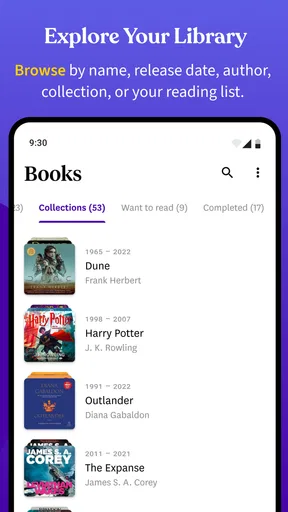
Bookcamp: Audiobooks for Plex is a mobile audiobook player designed to work with a personal Plex Media Server. After connecting to your Plex library, it lets you browse audiobook content, view available metadata, and continue listening from a phone or tablet. It is mainly intended for people who already manage their own audiobook collection through Plex rather than users looking for a standalone subscription-based audiobook catalog.
Do I need a Plex Media Server to use Bookcamp?
Yes, Bookcamp is built around Plex and generally requires access to a Plex Media Server containing your audiobook files. Before downloading the app, you should have Plex installed, your library organized, and the server reachable from the device you plan to use. If the server is offline, incorrectly configured, or inaccessible outside your home network, playback and library browsing may not work as expected.
Can I listen to audiobooks when I am offline?
Offline listening depends on the app’s available download or caching support and on how your Plex server is configured. Users should not assume that every audiobook can automatically be saved for travel or areas without internet access. If offline playback is important, check the current app listing and test downloading a title while connected to Wi-Fi before relying on Bookcamp during flights, commutes, or other situations with limited connectivity.
Does Bookcamp support audiobook progress and playback controls?
Bookcamp is intended to provide a more convenient audiobook-focused experience than using a general media player, including controls such as play, pause, seeking, and progress tracking. The exact synchronization behavior can depend on the app version, Plex setup, and server connection. If several people use the same Plex account or library, verify that listening positions are being saved correctly to avoid unexpected changes in playback progress.
Is Bookcamp: Audiobooks for Plex free to download?
The download price and any optional in-app purchases can vary between the Android and iOS versions, as well as over time. The app may be available as a free download while certain features, convenience tools, or premium functions require payment. Before installing, review the current store page for the listed price, subscription details, supported devices, and privacy information so there are no surprises after setup.
